토큰 아키텍처
Primitive·Semantic·Component 3계층 토큰 구조와 AI 친화 네이밍, W3C DTCG 1.0 포맷·Style Dictionary v5 변환 파이프라인, MCP 서버 연동으로 AI가 토큰을 추론·조합하게 만드는 설계
핵심 요약
- 토큰을 Primitive(원시값)·Semantic(의도)·Component(컴포넌트 전용) 3계층으로 나눈다. 컴포넌트가 Primitive를 직접 참조하지 못하게 막아야 AI가 의도를 읽어낸다.
- 네이밍은
category.property.variant.state구조로 통일하고, default·hover·active·disabled 상태 토큰 패턴을 일관 적용한다. - 2025년 10월 안정판이 나온 W3C DTCG 1.0(
$value·$type등$접두어,.tokens.json)을 기준으로 Style Dictionary v5가 CSS 변수·Tailwind v4@theme·TS·Figma로 변환한다. $description·$usage·$constraints·$avoid를 토큰에 명시해야 AI가 용도와 제약(예: WCAG AA 대비 4.5)을 지켜 선택한다.- Panda CSS·Figma MCP 서버로 토큰을 AI에 직접 노출하면 비인가 하드코딩 색상 감지와 시맨틱 토큰 추천을 자동화할 수 있다.
디자인 토큰은 디자인 시스템의 원자적 단위입니다. AI가 토큰을 제대로 이해하고 조합하려면 명확한 계층 구조와 시맨틱 네이밍이 있어야 합니다.
토큰 계층 구조
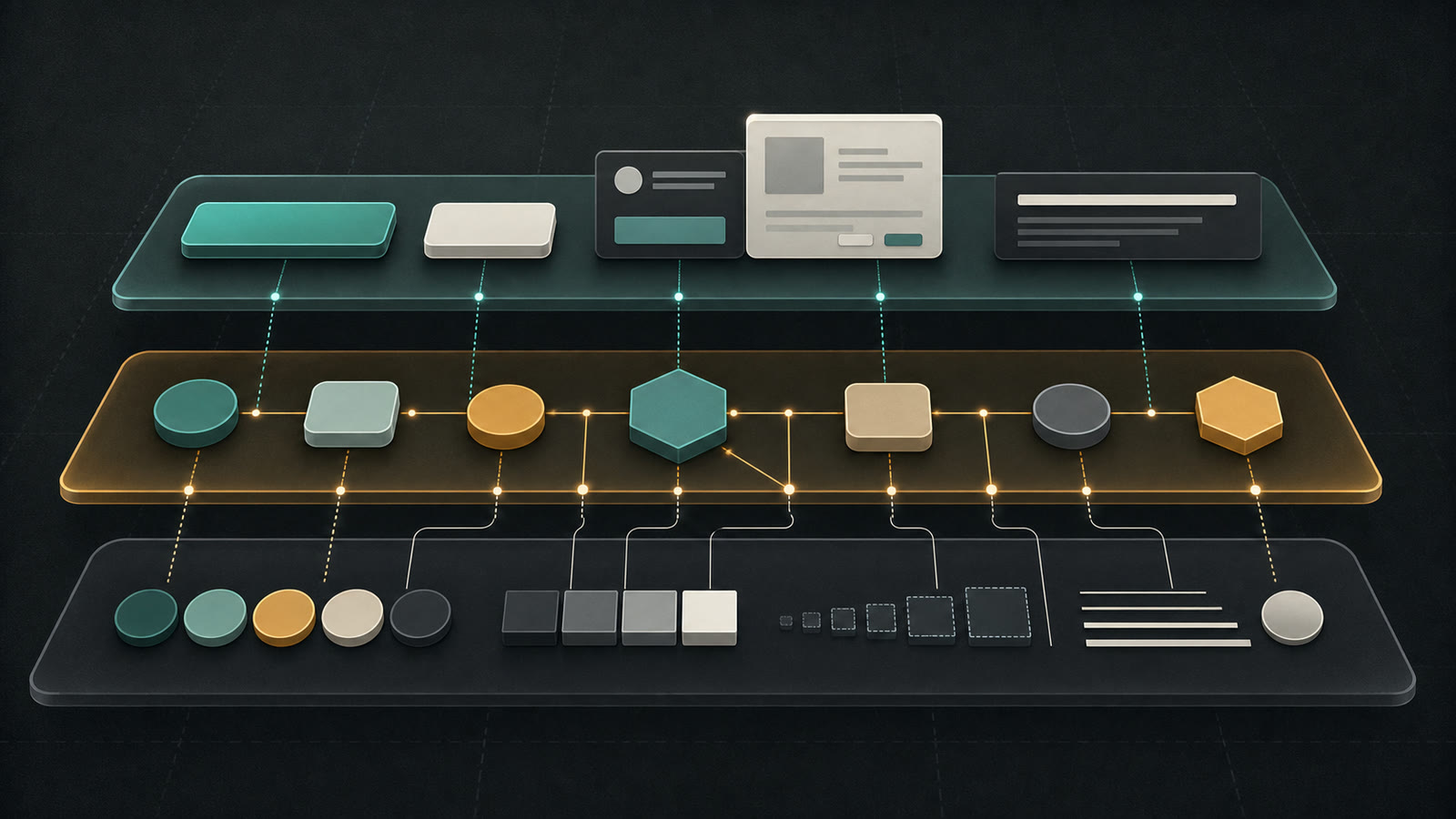
왜 3계층인가
| 계층 | 역할 | AI 활용 |
|---|---|---|
| Primitive | 브랜드 독립적 원시값 | 팔레트 범위 파악 |
| Semantic | 의도와 용도 표현 | 맥락에 맞는 선택 |
| Component | 특정 컴포넌트 전용 | 일관된 스타일 적용 |
안티패턴
컴포넌트가 Primitive 토큰을 직접 참조하면 AI는 의도를 추론하지 못합니다. colors.blue.500 대신
colors.primary를 쓰세요.
AI 친화적 네이밍 컨벤션
네이밍 구조
{category}.{property}.{variant}.{state}카테고리별 규칙
// tokens/colors.ts
export const colors = {
  // Primitive: 색상 팔레트
  blue: {
    50: '#EFF6FF',
    100: '#DBEAFE',
    500: '#3B82F6',
    900: '#1E3A8A',
  },

  // Semantic: 의도 기반
  primary: '{colors.blue.500}',
  secondary: '{colors.slate.600}',
  destructive: '{colors.red.500}',

  // Background
  background: {
    default: '{colors.white}',
    surface: '{colors.slate.50}',
    muted: '{colors.slate.100}',
  },

  // Foreground (텍스트)
  foreground: {
    default: '{colors.slate.900}',
    muted: '{colors.slate.500}',
    inverted: '{colors.white}',
  },

  // Border
  border: {
    default: '{colors.slate.200}',
    strong: '{colors.slate.300}',
  },
} as const
상태 토큰 패턴
// 상태별 토큰 정의
export const interactive = {
  button: {
    primary: {
      default: {
        background: '{colors.primary}',
        foreground: '{colors.foreground.inverted}',
      },
      hover: {
        background: '{colors.blue.600}',
      },
      active: {
        background: '{colors.blue.700}',
      },
      disabled: {
        background: '{colors.slate.300}',
        foreground: '{colors.slate.500}',
      },
    },
  },
} as const
토큰 스키마 정의
JSON Schema로 토큰 검증
{
  "$schema": "http://json-schema.org/draft-07/schema#",
  "title": "Design Token",
  "type": "object",
  "properties": {
    "$value": {
      "oneOf": [{ "type": "string" }, { "type": "number" }, { "$ref": "#/definitions/reference" }]
    },
    "$type": {
      "enum": ["color", "dimension", "fontFamily", "fontWeight", "duration", "cubicBezier"]
    },
    "$description": {
      "type": "string"
    }
  },
  "definitions": {
    "reference": {
      "type": "string",
      "pattern": "^\\{[a-zA-Z0-9.]+\\}$"
    }
  }
}
TypeScript 타입 정의
// types/tokens.ts
type TokenReference = `{${string}}`

interface TokenValue {
  $value: string | number | TokenReference
  $type?: TokenType
  $description?: string
}

type TokenType =
  | 'color'
  | 'dimension'
  | 'fontFamily'
  | 'fontWeight'
  | 'duration'
  | 'cubicBezier'
  | 'shadow'

// 타입 안전한 토큰 정의
type ColorToken = TokenValue & { $type: 'color' }
type DimensionToken = TokenValue & { $type: 'dimension' }
W3C Design Tokens Format Module 1.0
2025년 10월, 최초 안정판 출시
W3C Design Tokens Community Group이 벤더 중립적인 토큰 교환 포맷 1.0 안정판을 발표했습니다.
미디어 타입 application/design-tokens+json, 파일 확장자 .tokens 또는 .tokens.json을 사용합니다.
Style Dictionary v5, Tokens Studio, Figma 등 10개 이상의 도구가 네이티브 지원합니다.
DTCG 포맷 핵심
- 모든 스펙 정의 속성에
$접두어 사용 ($value,$type,$description,$extensions,$deprecated) - Display P3, Oklch 등 CSS Color Module 4 색상 공간 지원
$extends를 통한 테마/멀티 브랜드 상속- 하나의 토큰 파일로 iOS, Android, Web, Flutter 코드 생성
토큰 변환 파이프라인
Style Dictionary v5 설정
// config.ts (ESM)
import StyleDictionary from 'style-dictionary'

const sd = new StyleDictionary({
  source: ['tokens/**/*.tokens.json'],
  platforms: {
    css: {
      transformGroup: 'css',
      buildPath: 'dist/css/',
      files: [
        {
          destination: 'variables.css',
          format: 'css/variables',
          options: {
            outputReferences: true,
          },
        },
      ],
    },
    tailwind: {
      transformGroup: 'css',
      buildPath: 'dist/',
      files: [
        {
          destination: 'theme.css',
          format: 'css/variables',
          options: {
            selector: '@theme',
            outputReferences: true,
          },
        },
      ],
    },
    typescript: {
      transformGroup: 'js',
      buildPath: 'dist/ts/',
      files: [
        {
          destination: 'tokens.ts',
          format: 'typescript/es6-declarations',
        },
      ],
    },
  },
})

await sd.buildAllPlatforms()
Tailwind v4: tailwind.config.js 제거
Tailwind CSS v4에서는 tailwind.config.js가 제거되었습니다.
토큰 파이프라인 출력을 CSS @theme 블록으로 생성해야 합니다.
모든 토큰이 CSS 커스텀 프로퍼티로 자동 노출되므로 별도의 Tailwind 설정 파일이 필요 없습니다.
출력 예시
/* dist/css/variables.css */
:root {
  /* Primitive */
  --colors-blue-500: #3b82f6;

  /* Semantic */
  --colors-primary: var(--colors-blue-500);

  /* Component */
  --button-background: var(--colors-primary);
}

/* dist/theme.css — Tailwind v4 @theme 블록 */
@theme {
  --color-primary: var(--colors-primary);
  --color-destructive: var(--colors-destructive);
  --spacing-4: 16px;
  --radius-lg: 12px;
}
AI 컨텍스트용 토큰 문서
AI가 토큰을 제대로 골라 쓰게 하려면 용도와 제약을 명시해야 합니다.
// tokens/colors.documented.ts
export const colorTokens = {
  colors: {
    primary: {
      $value: '{colors.blue.500}',
      $type: 'color',
      $description: '주요 액션, CTA 버튼, 링크에 사용',
      $usage: ['button.primary', 'link.default'],
      $constraints: {
        contrast: {
          withWhite: 4.5, // WCAG AA 기준
        },
      },
    },
    destructive: {
      $value: '{colors.red.500}',
      $type: 'color',
      $description: '삭제, 위험 액션에만 사용. 일반 에러에는 사용 금지',
      $usage: ['button.destructive', 'badge.destructive'],
      $avoid: ['text.error', 'border.error'], // 이건 별도 토큰 사용
    },
  },
}
토큰 관계 그래프
Tokens Studio Graph Engine
Tokens Studio는 비주얼 노드 에디터인 Graph Engine을 제공합니다. 규칙과 변환, 조건을 시각적으로 정의해 토큰 파이프라인을 자동화합니다.
핵심 기능
- 팔레트 자동 생성: 단일 브랜드 색상에서 전체 스케일(50~950) 자동 생성
- 멀티 브랜드 테마 자동화: 조건 노드로 브랜드별 토큰 분기 처리
- 23개 이상 토큰 타입 지원: 색상, 타이포그래피, 간격, 보더, 그림자, 컴포지션 등
- Figma 플러그인 + 스튜디오 플랫폼: Figma 내에서 토큰 편집 후 코드로 동기화
- JSON/CSS 변수 내보내기: DTCG 포맷, CSS 커스텀 프로퍼티, Style Dictionary 호환
시간 절감 효과
잘 구조화된 토큰 시스템으로 디자인/개발 시간을 30~50% 절감할 수 있습니다. 특히 멀티 브랜드/멀티 플랫폼 환경일수록 Graph Engine 자동화가 더 크게 빛납니다.
MCP 서버 연동
디자인 토큰을 AI 어시스턴트에 직접 노출하면 토큰 시스템 준수를 자동으로 검사할 수 있습니다.
Panda CSS MCP 서버
# MCP 서버 설치 및 실행
npx @pandacss/mcp-server
Panda CSS MCP 서버를 쓰면 AI 어시스턴트가 토큰 시스템에 직접 접근합니다.
- 비인가 색상 감지: 토큰에 정의되지 않은 하드코딩 색상값 자동 탐지
- 타이포그래피 이슈 식별: 토큰 외 폰트 크기/웨이트 사용 경고
- 토큰 추천: 컨텍스트에 맞는 시맨틱 토큰 자동 제안
Figma MCP 서버
Figma MCP 서버는 Variables API를 통해 DTCG 포맷 import/export를 지원합니다.
// Figma MCP 서버 설정 예시
{
  "mcpServers": {
    "figma": {
      "command": "npx",
      "args": ["-y", "figma-developer-mcp", "--figma-api-key=YOUR_KEY"]
    },
    "pandacss": {
      "command": "npx",
      "args": ["-y", "@pandacss/mcp-server"]
    }
  }
}
참고
Panda CSS MCP 서버 문서: https://panda-css.com/docs/ai/mcp-server